AI-driven accessibility
Ada Styles Setup Macro (Word)
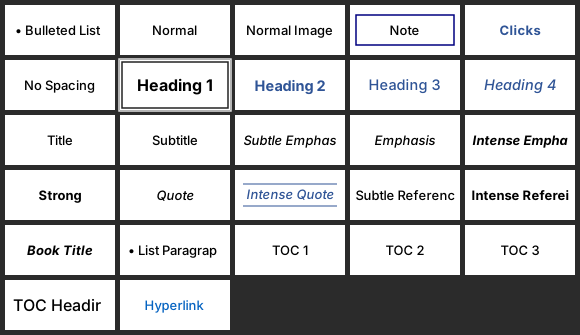
A Word macro that installs the team's custom WCAG-compliant styles, header, and branding onto any teammate's machine — so every designer has the correct, accessible styles ready to apply.
 Automation
The Problem
The team had never had a shared styling standard, and Word styles live per-machine — so designers didn't reliably have the same WCAG-compliant styles, header, and branding available, which made guides inconsistent and per-computer setup tedious.
Design Story
As the team built its ADA Word standard, every designer needed the same styles on their own machine — and setting that up by hand took time on each computer, so I automated it.
Complexity
Word's styles and templates are configured per-machine; getting an identical style set and branded header into everyone's Word — reliably, without hand-configuring each computer — was the challenge.
The Designed Solution
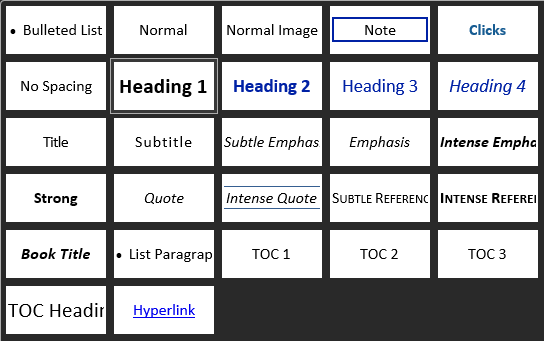
A Word macro (ReplaceNormalTemplate / StyleUpdater) that imports the team's custom styles, header, and branding into a user's Word environment, making the full set of correct, accessible styles available to apply in any new document — replacing the roughly five-minutes-per-machine manual setup.
Design Decisions
- Distributed the team's official styles, header, and branding so everyone works from one source.
- Set the styles up on a teammate's machine in seconds, rather than configuring each computer by hand.
- Kept styling itself a deliberate, human step — the macro provides the toolkit, not automatic formatting.
The Result
Every designer has the same WCAG-compliant styles and branded header at their fingertips.
Impact
Standardized styling across the team during the ~1,000-guide remediation, removed per-machine setup friction, and laid groundwork for the Document Generator — credited as a standout in my mid-point review and across recommendations.
Outcome
Adopted team-wide as a standard setup tool.